 Echo Korean
1Install it
Android only for now. iPhone isn't supported yet.
Install the app (recommended) #
- On your phone, tap Get the Android app. (It has to be the phone, not a computer.)
- If you see "This type of file can harm your device", tap OK — it's the standard warning for any file downloaded outside the Play Store.
- When the download finishes, tap the notification to install.
- If Android says the app is from an unknown source, follow Settings → Allow from this source → Back → Install.
These steps exist only because the app isn't in the Play Store yet. They go away once it launches.
If the install is blocked #
On Samsung phones this is where most people get stuck
Samsung's Auto Blocker stops apps that didn't come from a store. Turn it off:
Settings → Security and privacy → Auto Blocker → turn it off
Then try the install again. You can turn Auto Blocker back on afterwards — the app keeps working.
If it still won't go, open your Downloads folder and tap echo-korean.apk directly. That's the way in when the notification has disappeared.
Or use it on the web, no install #
Don't want to install anything? Open it in the browser — almost everything works the same.
It has to be Chrome
Browsers built into other apps — WhatsApp, Instagram, Telegram, X, Facebook, KakaoTalk and so on — have no speech recognition at all. If you got here by tapping a link inside one of those apps, use the Open in Chrome button the app shows you.
On the web, keep the screen on while you use it. If the screen switches off, the browser pauses the page.
2First run
A one-time setup. Three minutes.
Sign in with Google #
Translation goes through a server, so you need to be signed in. Tap the person icon 👤 at the top right, then Sign in with Google.
Once you're signed in your sentences are saved to your account, so they follow you to a new phone or a reinstall.
Allow the microphone #
The first time you press Start, Android asks whether the app may use the microphone. Tap Allow. Allow notifications too if you're asked — while the app is listening it shows a "Listening" notification, which is how you can tell it's still running.
Say your first sentence #
- Press the big 🎙️ Start button in the middle.
- Speak English, normally. While you talk, the words appear at the top under "Listening…".
- Stop talking. After about 1.5 seconds the app decides that was one sentence.
- A moment later the Korean appears — with its romanization — and plays out loud.
What time should we meet tomorrow?
내일 몇 시에 만나요?
nae-il myeot si-e man-na-yo?
Earphones make it nicer
With bone-conduction earphones you still hear the room while the Korean goes into your ear. They're not required — on a speaker the app pauses listening while it talks so it doesn't hear itself.
3The main screen
Every button, in one table.
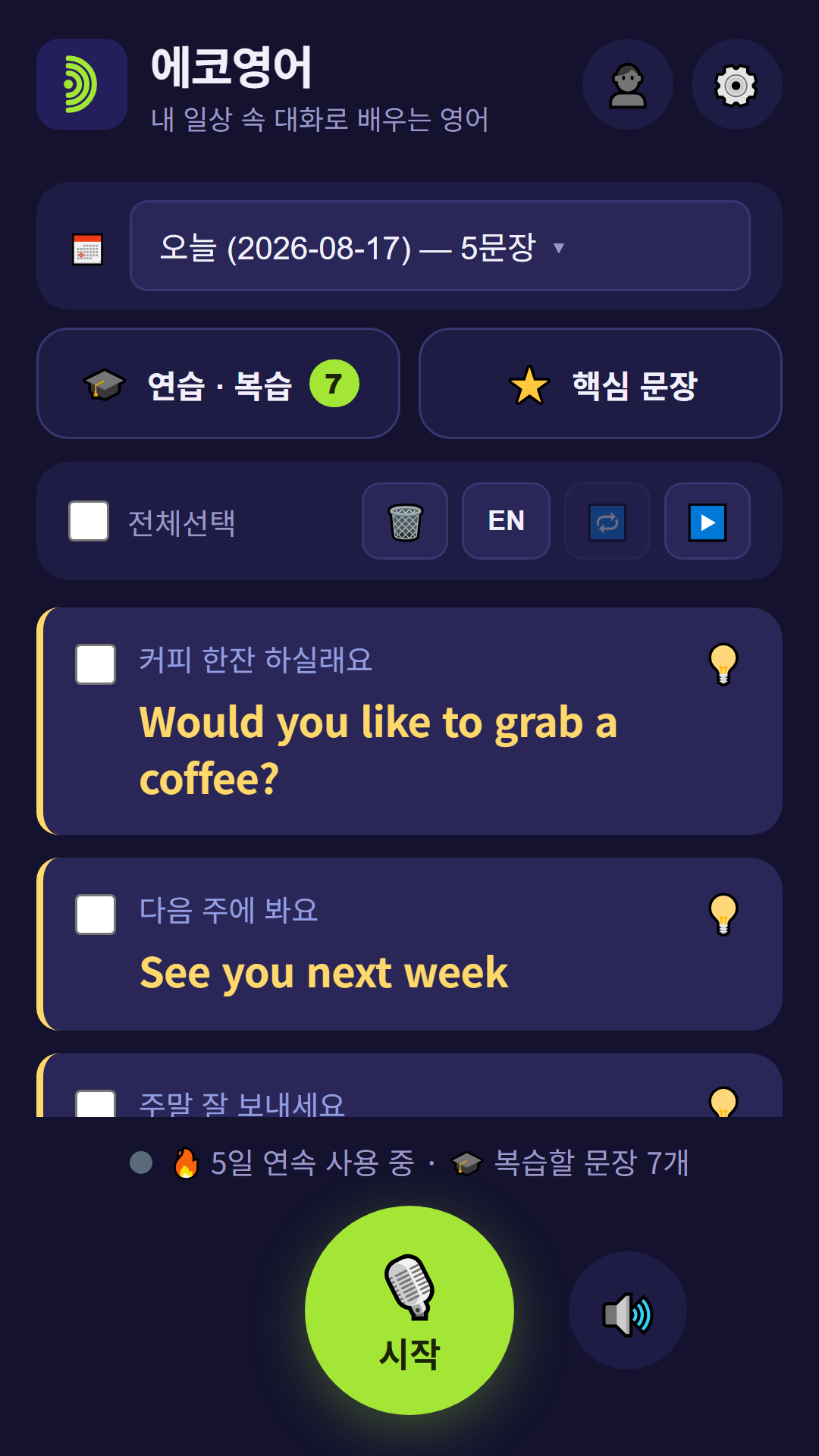
| Button | What it does |
|---|---|
| 🎙️ Start | Starts listening. Turns into Stop. |
| 🔊 / 🔇 | Korean audio on and off. With it off, sentences pile up silently on screen. Pressing play turns it back on automatically. |
| 👤 | Account — sign in and out, sync now |
| ⚙️ | Settings |
| 📅 Today | Pick a date. You can show several days at once. |
| 🎓 Practice | See English, say Korean · spaced review · weekly report · ✨ sentences made for you |
| 📔 Diary | Write about your day in English and get it back in Korean (section 6) |
| 📌 Daily | Adds today's 10 everyday sentences, or jumps to them if they're already there |
Missing buttons on a fresh install? That's normal
The buttons at the top (📅 🎓 📔 📌) appear once you have a sentence — on a brand-new install, today's 10 everyday sentences usually arrive within a few seconds, so they show up straight away.
The row above your sentences #
| Button | What it does |
|---|---|
| Select all | Ticks every sentence on screen. |
| 🗑️ | Deletes the ticked sentences. (Nothing ticked? It clears the whole day you're looking at.) |
| KO | Playback mode. Tap to switch between Korean only and EN→KO — your English first, then the Korean. |
| 🔁 | Repeat the list on and off. |
| 🗣️ | Repeat after me on and off. When it's on, there's a pause after each Korean sentence to say it back — long enough for that sentence (on by default). |
| ▶️ / ⏸ | Play. Just the ticked ones if any are ticked, otherwise everything. Press ⏸ to pause; press ▶️ again and it carries on from the sentence where you stopped — even after closing the app. |
To hear one sentence on its own
Tick the box to the left of it and press ▶️.
A sentence card #
Each card holds three lines: what you said in small text, the Korean in large yellow text, and the romanization underneath. Tap 💡 at the top right to open the explanation.
It misheard you? Fix it
Tap the small English line (it has a faint ✏️). Correct it, press Fix & translate again, and the Korean is redone. The explanation and review history for that sentence start fresh.
4🔤 Romanization
You don't need to read Hangul to start using this app.
Under every Korean sentence there's a line of Latin letters, split syllable by syllable so you can follow the sounds:
Did you eat?
밥 먹었어요?
bap meo-geo-sseo-yo?
The hyphens are there on purpose. Korean is written in syllable blocks, and seeing where each block starts and ends is most of what makes Hangul click later on.
It also follows what Korean actually sounds like rather than how it's spelled — 먹었어요 is written meok-eoss-eo-yo letter by letter, but it comes out of a Korean mouth as meo-geo-sseo-yo, and that's what you'll see.
Turn it off when you're ready
⚙️ Settings → Display → Show romanization. It's on by default. Switching it off is what pushes you to actually read the Hangul — and you can switch it back on any time. Old sentences follow the setting too.
5💡 Explanations
A translation alone is just a translation. Knowing why it's said that way is what makes it come out of your own mouth next time.
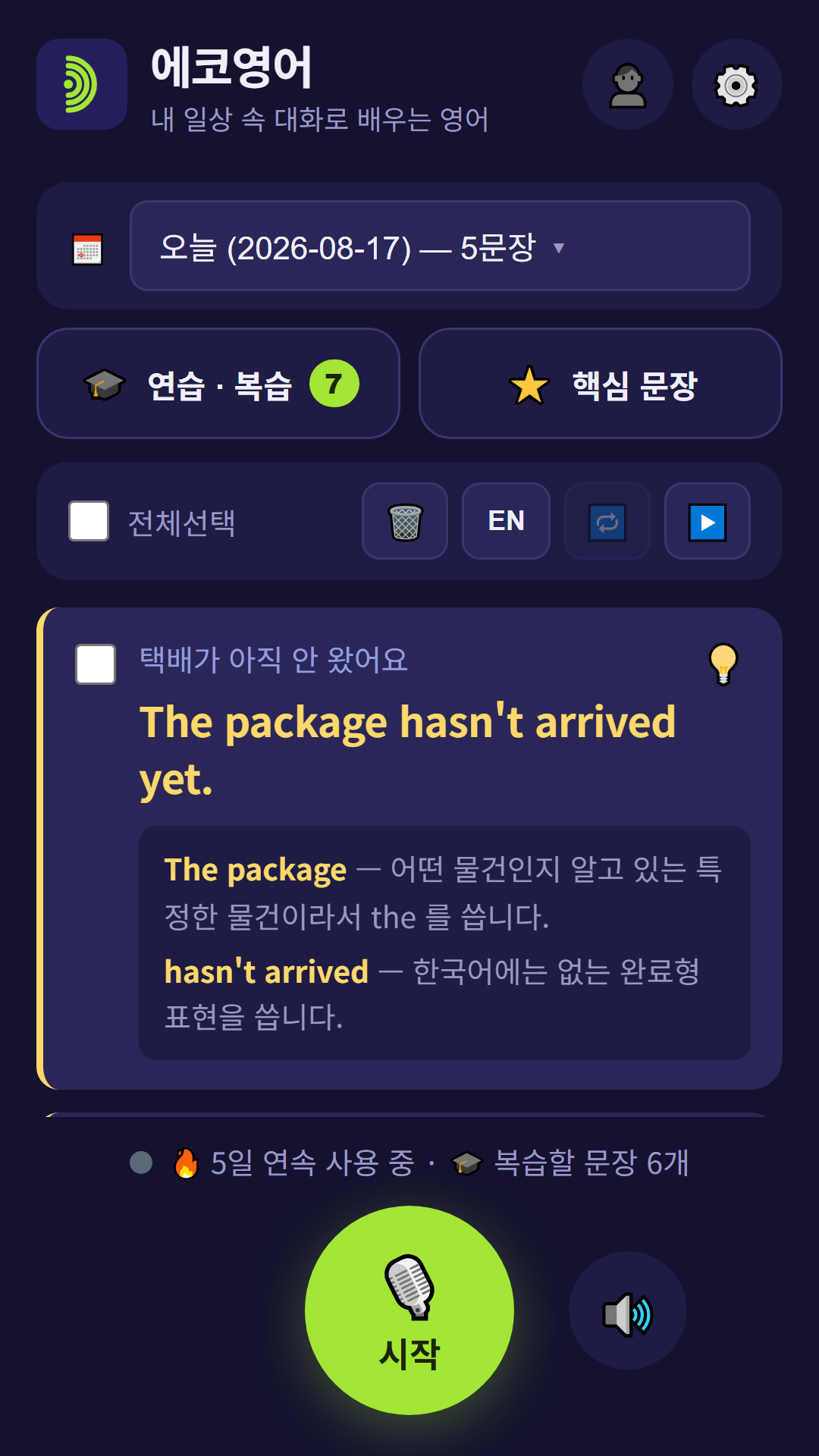
Tap 💡 at the top right of a card and you get two or three lines about the parts English speakers trip over:
- Particles — why it's 은/는 here but 이/가 there, when 을/를 shows up
- Word order — why the verb always lands at the very end
- Endings — how -요 makes it polite, how tense is built in
- Tap 💡 again to close it.
- An explanation you've already fetched is saved, so it opens instantly next time.
Explanations are a Premium feature — free for your first week
Listening, translating (30 a day), romanization, the diary, daily sentences and practice are all free. Explanations are part of Premium, and they're free for a week starting the first time you tap 💡.
The clock starts when you first tap it, not when you sign up — so if you don't get to it for a month, the full week is still waiting. Check what's left under ⚙️ Settings → Translation.
These are written by an AI, so once in a while one is awkward or not quite right. If you spot a bad one, tell us — it genuinely helps.
6📔 Diary & 📌 Daily sentences
Your own day, in Korean — and something to practise even on days you don't talk much.
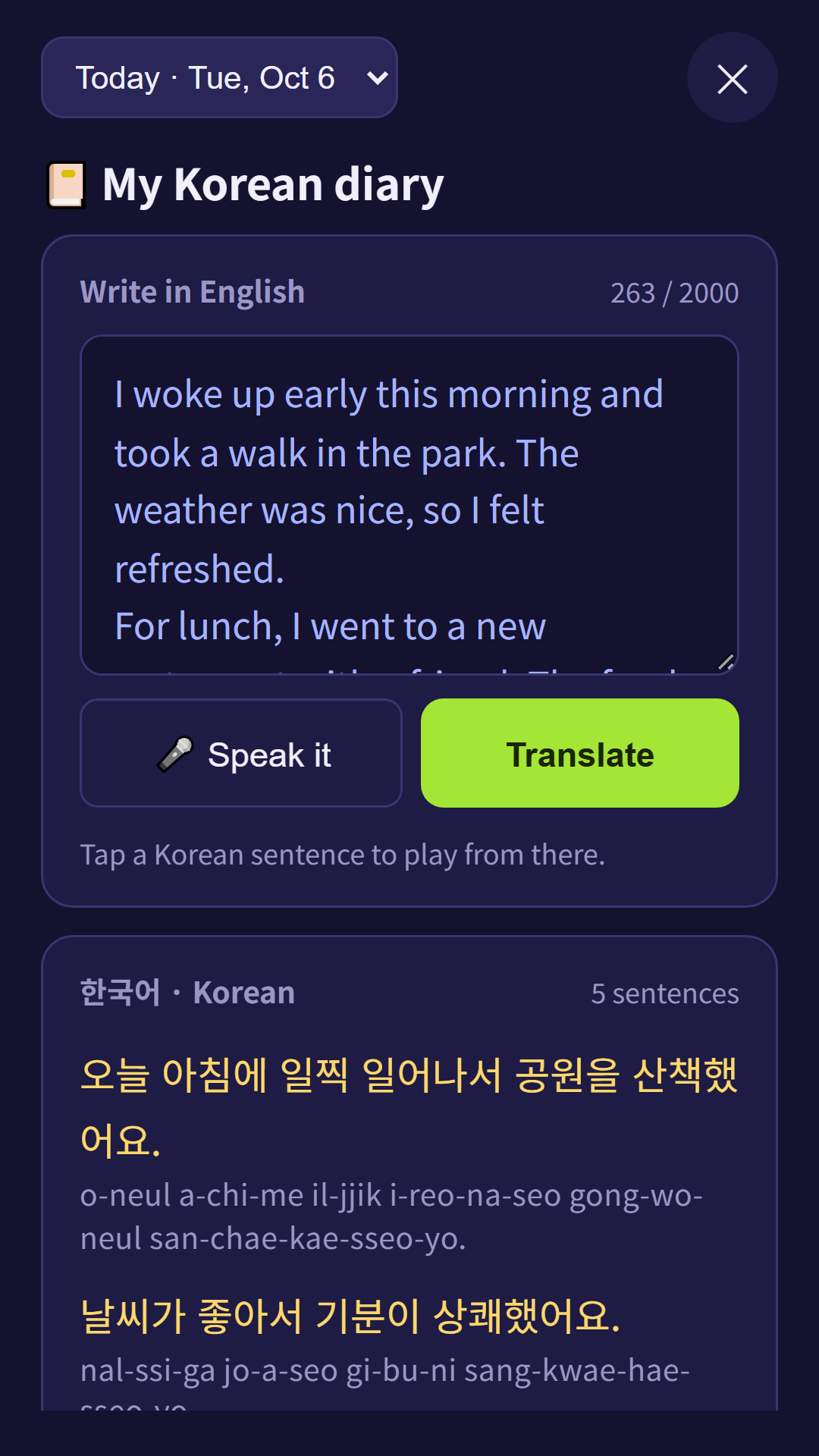
📔 My Korean diary #
- Tap 📔 Diary at the top.
- Write a few lines about your day in English — or tap 🎤 Speak it and just talk. About 3 minutes is plenty.
- When you stop speaking, or tap somewhere else, it turns into Korean on its own. Every Korean sentence has its romanization right under it.
- Press ▶️ Listen in Korean. Tap any Korean sentence to start from there, ⏮ to start over.
- One diary per day. Pick an earlier date at the top to read back.
- Under today's diary you'll see today's sentences as cards — tap one to drop it into your diary and use the expression yourself.
- Each translation counts as one of your 30 a day. Changing the English and translating again counts again.
📌 Today's everyday sentences #
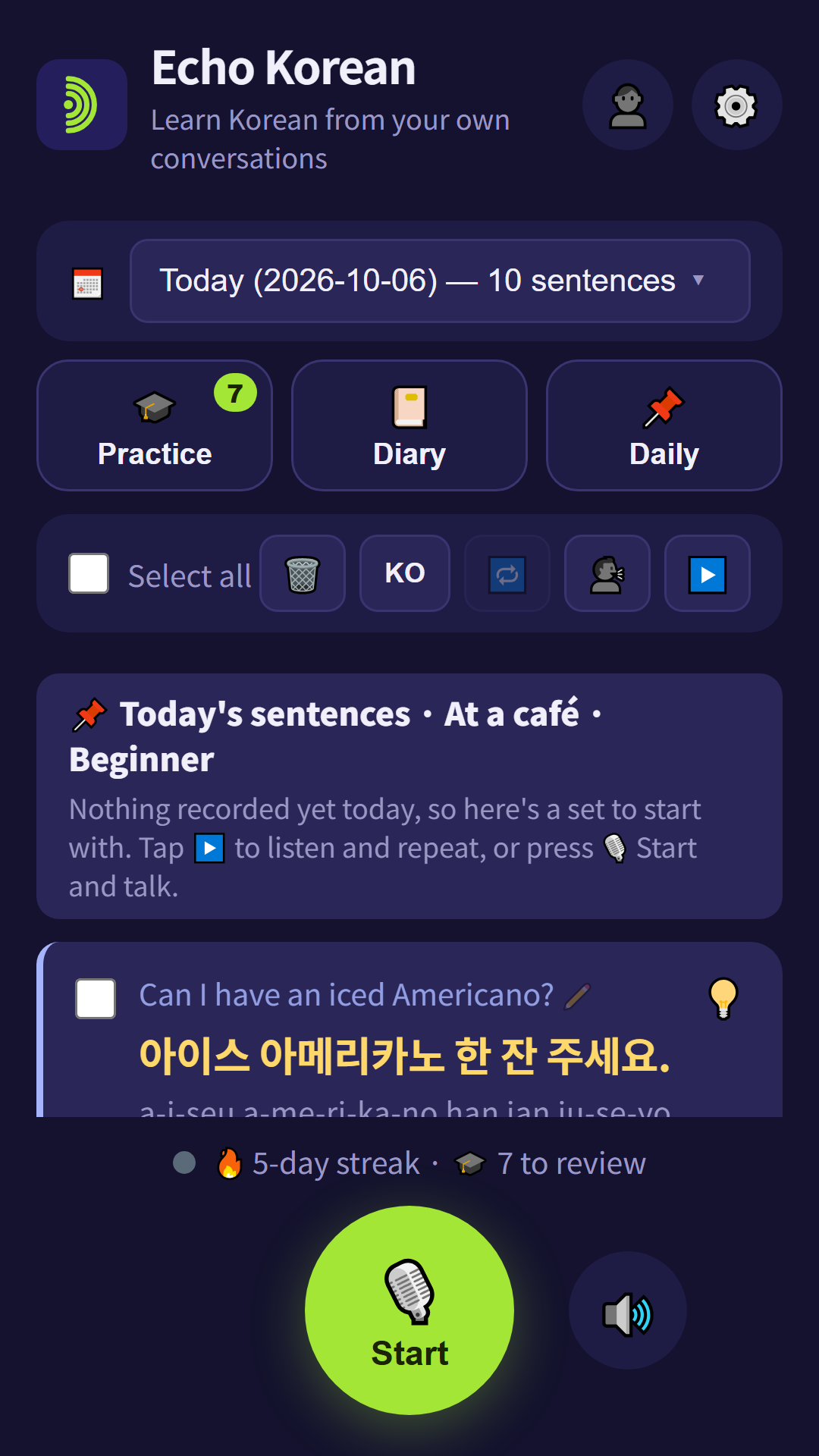
If you haven't said anything yet today, the app puts 10 everyday Korean sentences on a topic at the top of the list — at a café, at the clinic, on the subway. Play them, repeat after them, practise and review them just like your own sentences. They don't use up your translations.
Already talked today? Tap 📌 Daily to get them anyway.
In ⚙️ Settings → 📌 Today's sentences you can choose Beginner or Intermediate, pick the topics you care about (they take turns, one a day), turn them off, and set a morning reminder on the Android app.
7🎓 Practice & review
You only own a sentence once you've said it yourself.
See English, say Korean #
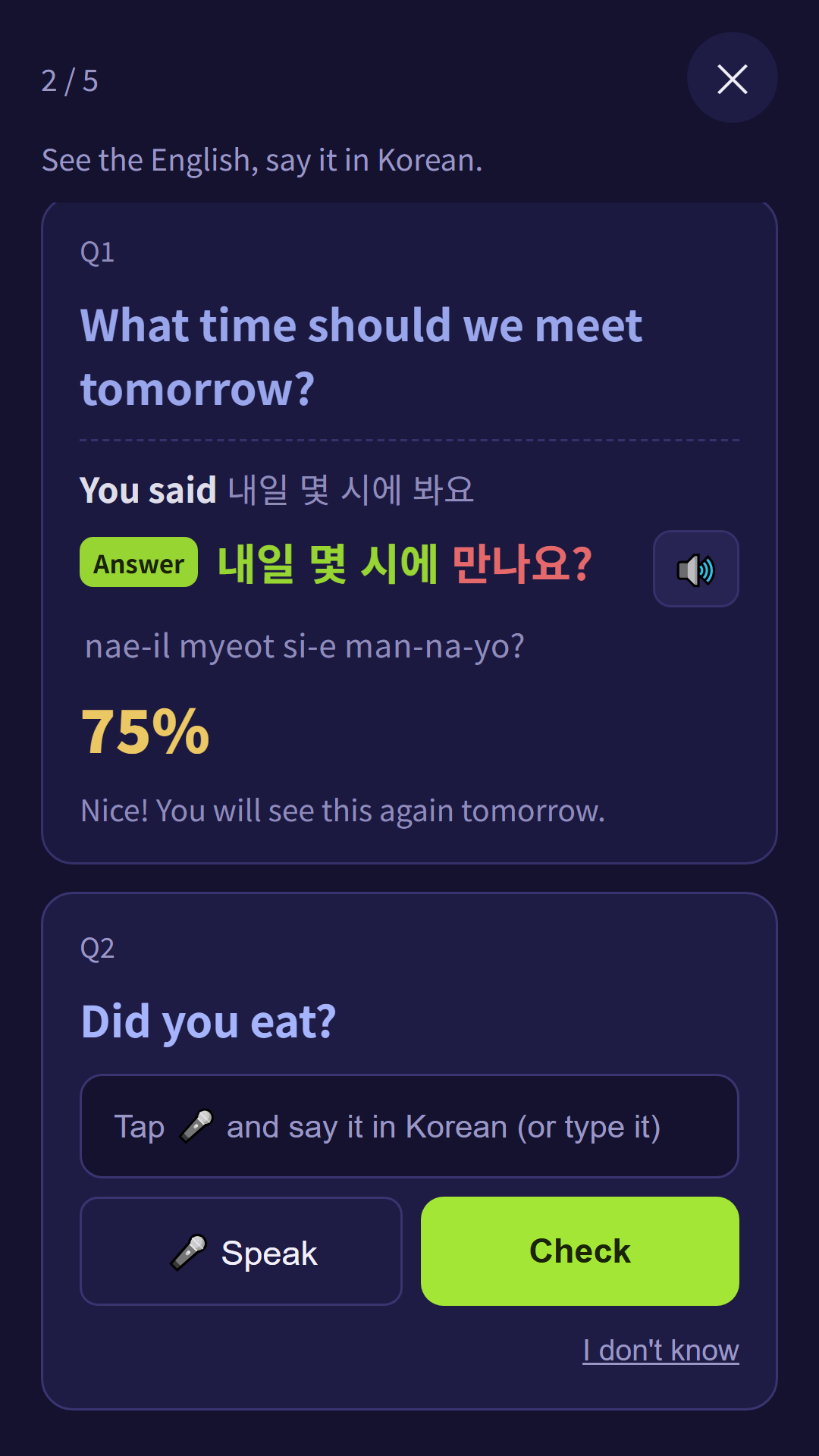
Each card shows only the English. Tap 🎤 Speak and say it in Korean (or type it), and it's checked straight away:
- Your answer, then the right answer with the parts you got in green and the parts you missed in red, its romanization, and a score.
- Tap 🔊 next to the answer to hear it.
- No idea? Tap I don't know and the answer is shown.
- Cards stack up below each other, so you can scroll back to the ones you missed. At the end you get your average.
Want to listen and repeat instead? That's what 🗣️ and ▶️ on the main list are for (section 3).
Your phone has to recognise Korean speech for this. Almost all Android phones do; if it doesn't, install the Korean language pack under Settings → General management → Language.
Review comes back on its own #
Sentences you get right return after 1 → 3 → 7 → 16 → 35 days, spacing out as they stick. Ones you miss come back the next day. The idea is to meet each sentence again right about when you'd have forgotten it.
Start today's review takes whatever is due today first. If that's fewer than 20 sentences, it tops up with recent ones you haven't practised yet — so there's always something to do, even on a day with nothing due.
Want specific sentences instead? Tick them in the list and press Practice selected sentences.
Sentences you said yourself come first; today's sentences and ones made for you come after.
✨ Sentences made for you (Premium) #
On the same screen, ✨ Make 10 sentences for me looks at what you've actually been saying lately and writes 10 new Korean expressions that fit your life. They land in today's list with their own heading. You need at least 5 sentences of your own first, and you can make up to 5 sets a day.
Weekly report #
Lower down the same screen: how many sentences you recorded this week, how long you had the app running, and how many days in a row you've used it.
If you're testing the app for us
That "Time listening" number is the single most useful thing you can send us. How many minutes a day people actually run it decides how the app gets priced. (The number lives on your phone only — it's never uploaded.)
8⚙️ Settings
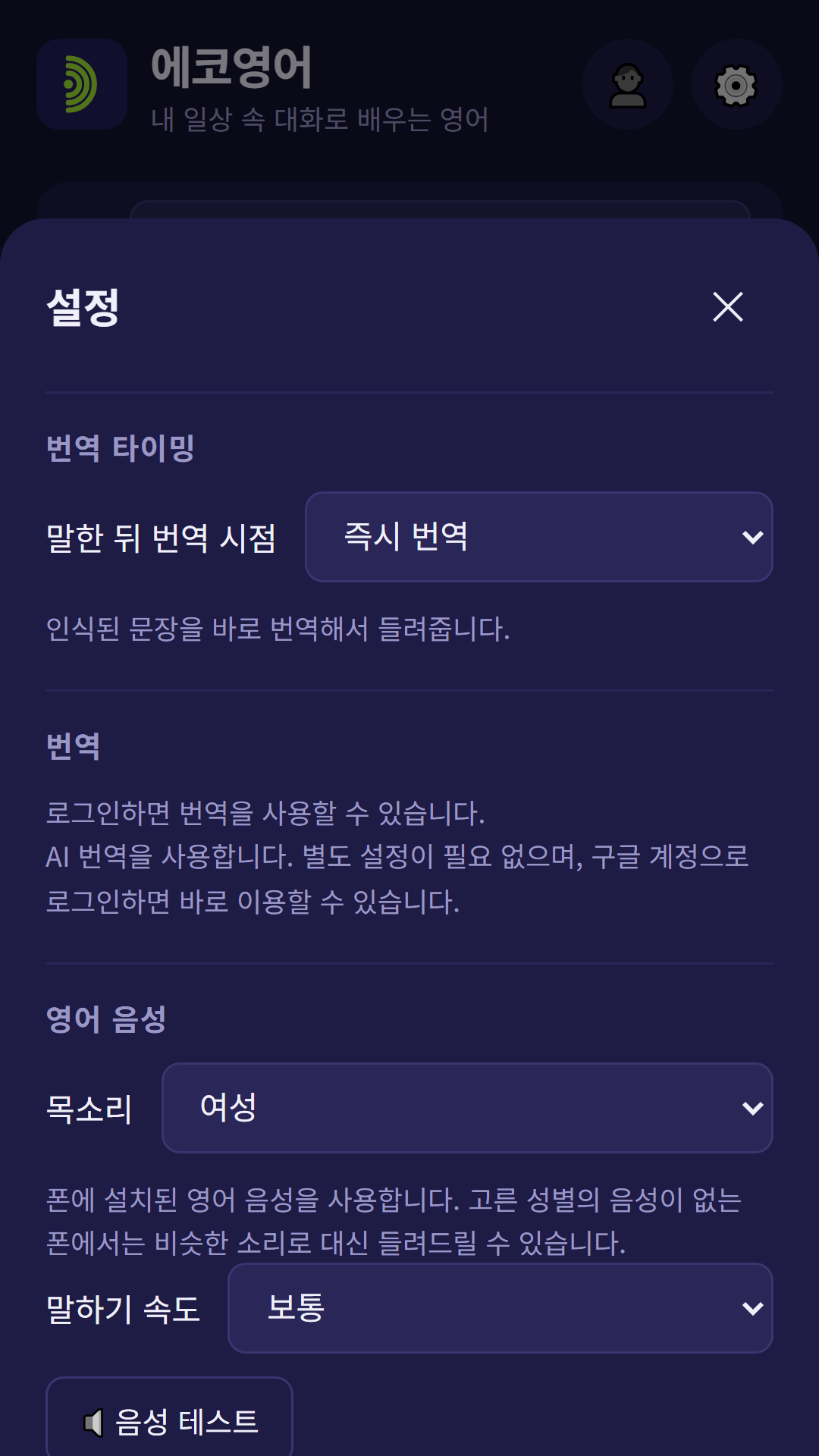
The defaults are fine. Come here only when something bothers you.
| Setting | What it's for |
|---|---|
| When to translate | Right away by default. Pick after 3 / 5 / 10 seconds if you'd rather guess first, or Save only, no sound when you're somewhere quiet. (Play them back later.) |
| Show romanization | On by default. See section 4. |
| Premium | At the top. Subscribe, restore a purchase, or manage your subscription (Android app). |
| Korean voice | Female or male, and Slow / Normal / Fast. If the Korean goes past you, put it on Slow — you'll catch far more. The pause in repeat-after-me gets longer with it. |
| Repeat each sentence | How many times each sentence plays before ▶️ moves on: 1, 2, 3 or 5. With 🗣️ on, you get a pause after every play. |
| 📌 Today's sentences | On/off, Beginner / Intermediate, your topics, and the 🔔 morning reminder (7 AM – 8 PM, Android app only). |
| Pause before a sentence ends | How long the app waits after you stop talking before it calls that one sentence. Default is Normal (1.5s). |
| Pause listening while Korean plays | On by default. Stops the app from hearing its own voice through the speaker. If you use earphones you can turn it off and it'll never miss a word. |
| Export | Saves every sentence — English, Korean and romanization — to a text file. |
If your sentences keep getting cut in half
Set Pause before a sentence ends to Long (2.0s). That fixes it for most people who pause mid-thought. If you'd rather have the Korean sooner, go the other way — Short (1.0s).
Your daily allowance #
The free plan translates 30 sentences a day, and it refills at midnight. To see how much you've used today: ⚙️ Settings → Translation.
Playing back, reviewing and practising sentences you've already translated doesn't count against it, and neither do today's sentences. Each diary translation counts as one. Premium removes the limit.
9Getting the most out of it
What we've learned from using it every day.
- Don't try to study. Leave it running and talk normally. That really is the whole method.
- Talking to yourself counts. "What should I eat today" is exactly the kind of sentence you'll need a hundred times.
- Somewhere quiet? Use Save only, no sound and listen back later with ▶️.
- One sentence at a time works better. Long unbroken speech can get cut off partway.
- Leave the romanization on for the first week or two, then turn it off. Trying to read the Hangul with the answer one line below is where it starts to stick.
- Leave 🗣️ repeat-after-me on and actually say each sentence out loud in the pause. Set Repeat each sentence to 2 or 3 for the ones that won't stick.
- Write three lines in 📔 Diary at night. Your own day, read back to you in Korean, is the most personal textbook there is.
- Five minutes of 🎓 Start today's review before bed is enough.
10When something breaks
Tap a question to open it.
It doesn't pick up what I say
- Check the microphone permission: Settings → Apps → Echo Korean → Permissions → Microphone
- Another app holding the microphone — a call, a recorder, a voice assistant — will stop recognition. Close it and start again.
- On the web, make sure you're in Chrome. Browsers inside WhatsApp, Instagram, Telegram and the like don't work.
- Still nothing? Press Stop and then Start again.
My sentences get cut off before I've finished
Set ⚙️ Settings → Pause before a sentence ends to Long (2.0s). If you leave gaps mid-sentence, that alone usually fixes it.
If it still happens, try one sentence at a time. Android's speech recognition was never built to hold a long unbroken stretch of speech.
I keep hearing a beep
That's Android's own sound when speech recognition restarts. The app restarts it constantly so it can keep listening, so you'll hear it now and then. Nothing is wrong.
If it bothers you, turn down your phone's system sounds — that's separate from media volume.
It stops a few minutes after I turn the screen off
Android takes the microphone back from apps once the screen is off. For now, keep the screen on while you're using it.
That's why the app holds the screen awake by itself while listening — just leave it be. If the "Listening" notification is showing, everything is fine.
We're still looking for a way around this.
Practice can't hear my Korean
Practice needs your phone to recognise Korean, which is separate from English. Add it under Settings → General management → Language (Samsung) or Settings → System → Languages (most other phones).
Everything else in the app keeps working without it — this only affects the 🎤 Speak button.
It says to check my internet connection
Translation runs through a server, so it needs a connection. Check that Wi-Fi or mobile data is on.
If your connection is clearly fine and it still says this, it's probably our end — let us know.
It says I've used up the free daily limit
The free plan is 30 sentences a day and it refills at midnight.
Playing back, reviewing and practising sentences you've already translated is unaffected — that part never runs out.
I can't sign in
Check that a Google account is set up on the phone: Settings → Accounts
If it still fails, close the app completely and reopen it. If that doesn't do it, send us a screenshot — it's usually quick to spot.
I tapped a link in a messaging app and nothing works
Browsers built into apps like WhatsApp, Instagram, Telegram, X, Facebook and KakaoTalk have no speech recognition. Use the Open in Chrome button the app shows, or Copy link and paste it into Chrome's address bar.
I hear a short “ding” while it's listening
That's the sound Android makes when speech recognition switches back on. The app restarts listening briefly after every sentence, so it can happen often. The current version silences most of these by muting media sound for that moment — if you still hear it, update the app.
Still bothering you? Turn down your phone's system sounds (separate from music and media volume). If you play music from another app at the same time, it may drop out for about a second when this happens.
My sentences have disappeared
If you signed in with Google, they're on your account. Sign in again and they come back.
If you were using it signed out, they only ever existed on the phone and go away with the app. Keep anything important with ⚙️ Settings → Export everything as a text file.
11Your privacy
- No audio is stored. Speech becomes text and the sound is gone.
- What's saved on your phone: the text of what you said, its Korean translation, the time, your review schedule, your practice scores, and any explanation you've fetched. Signed in, that syncs to your account only.
- The "time listening" figure stays on your phone and is never uploaded.
- You can delete anything at any time with 🗑️, or delete your whole account from 👤 Account.
The full text is in the privacy policy.
Something not covered here?
Just tell us. What annoyed you while using it is the most useful thing we can hear.
Send feedback Email us